 Lunch Money Developer PortalLunch Money Developer Portal
Treat expiration, refresh, revocation, and reauthorization as separate events. Your integration should expect every token to stop working eventually.
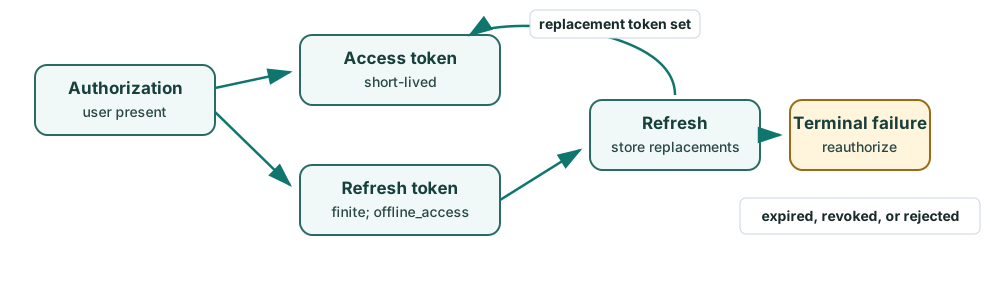
Teal boxes show the normal token lifecycle. The amber box marks a terminal failure that requires the user to authorize again.
Keep each token set associated with the application user and the authorized Lunch Money user and budget account pair. Renewing credentials does not change that pair; selecting another budget account requires a new authorization. See users, budget accounts, and access tokens.
Access tokens are deliberately short-lived. Record when the token response arrives and add its expires_in duration to determine the expected expiry. Refresh slightly before that point while accounting for clock skew. Do not parse the opaque access token or assume a fixed lifetime.
A refresh token is issued after a successful authorization-code exchange only when the registered client includes offline_access. It lasts longer than an access token, but it is not permanent.
The confidential Node.js sample keeps refresh optional within its first-run walkthrough. Register the sample client with offline_access to exercise the refresh branch, or omit it to focus on authorization, GET /v2/me, revocation, and reauthorization.
Send a form-encoded grant_type=refresh_token request to the discovered token endpoint. Confidential clients authenticate with client_secret_basic; public clients send their client ID without a secret. A refresh never expands or switches the grant's registered scopes, Lunch Money user, or budget-account identity.
Atomically persist the complete replacement token set before discarding the previous value, and serialize refreshes for each active application-user and Lunch Money user/account connection. Lunch Money rotates refresh tokens; replay of a consumed token can invalidate the token family. Treat transient failures according to a bounded retry policy, but treat invalid_grant as terminal: delete unusable credentials for that connection and start a fresh authorization.
Send the active connection's token to the discovered revocation endpoint using the authentication method appropriate to the client. Revocation returns success without revealing unnecessary token state. Locally discard that connection's access token, refresh token, and related session state even if the network response is ambiguous. Keep other user/account connections unchanged.
https://api.lunchmoney.dev/oauth/revoke. Use authorization-server discovery to configure deployed applications so they receive the current endpoint automatically.For a quick development test, the following requests revoke an access token. They assume the values have already been loaded into shell variables from your secure development configuration.
curl --request POST 'https://api.lunchmoney.dev/oauth/revoke' \
  --user "$LUNCH_MONEY_CLIENT_ID:$LUNCH_MONEY_CLIENT_SECRET" \
  --header 'Content-Type: application/x-www-form-urlencoded' \
  --data-urlencode "token=$LUNCH_MONEY_ACCESS_TOKEN" \
  --data 'token_type_hint=access_token'
curl --request POST 'https://api.lunchmoney.dev/oauth/revoke' \
  --header 'Content-Type: application/x-www-form-urlencoded' \
  --data-urlencode "client_id=$LUNCH_MONEY_CLIENT_ID" \
  --data-urlencode "token=$LUNCH_MONEY_ACCESS_TOKEN" \
  --data 'token_type_hint=access_token'
Do not paste a real client secret or token directly into a command where it may be saved in shell history. If the authorization also has a refresh token, revoke or otherwise invalidate it before testing a flow that should require the user to authorize again, then discard both tokens locally.
Revocation is different from expiration: expiration ends one credential naturally, while revocation deliberately removes access. Deleting or disabling an application and loss of user access can also make tokens unusable.
A Lunch Money user can also revoke an application's access from the Connected Apps page. User revocation applies to the selected Lunch Money user and budget-account authorization. Your application should treat the resulting authentication failure as terminal for that connection and ask the user to authorize it again when they want to reconnect. Keep every stored Lunch Money user/account connection independent, including when two users have authorized the same shared account_id.
Remote revocation is different from local credential deletion. If an application offers a local-only “forget” action, confirm it and explain that the remote authorization remains active. Removing the active user's final local connection should leave the application disconnected rather than expose a hidden connection belonging to another Lunch Money user.
401 response does not identify which cause applies. Follow the API failure decision tree.See troubleshooting for error-specific guidance.